
Signs have always been an important way to share information. Shops, offices, malls, hospitals, schools, and public places all use signage to guide people, promote offers, and display messages. For many years, this signage was printed on boards, banners, or posters.
Today, digital signage is becoming the better and smarter choice. Many businesses are now upgrading old signage to digital because it looks modern, works faster, and gives better results. If you are still using traditional signs, this guide will help you understand how to move from old signage to digital in a simple and clear way.
What Is Old or Traditional Signage?
Old signage usually means signs that do not use screens or digital technology. These include:
- Printed posters
- Banners
- Flex boards
- Wall paintings
- Static signboards
These signs show the same message all the time. If you want to change the message, you must print a new sign and replace the old one.
What Is Digital Signage?
Digital signage uses screens to display content. This content can be images, videos, text, animations, or live updates. Digital signage is controlled using software, which allows you to change content anytime.
Common examples include:
- LED screens in shops
- Display panels in offices
- Information screens in hospitals
- Menu boards in restaurants
Many businesses search for Digital signage near me when they want to upgrade because local support makes installation and maintenance easier.
Why Upgrade Old Signage to Digital?
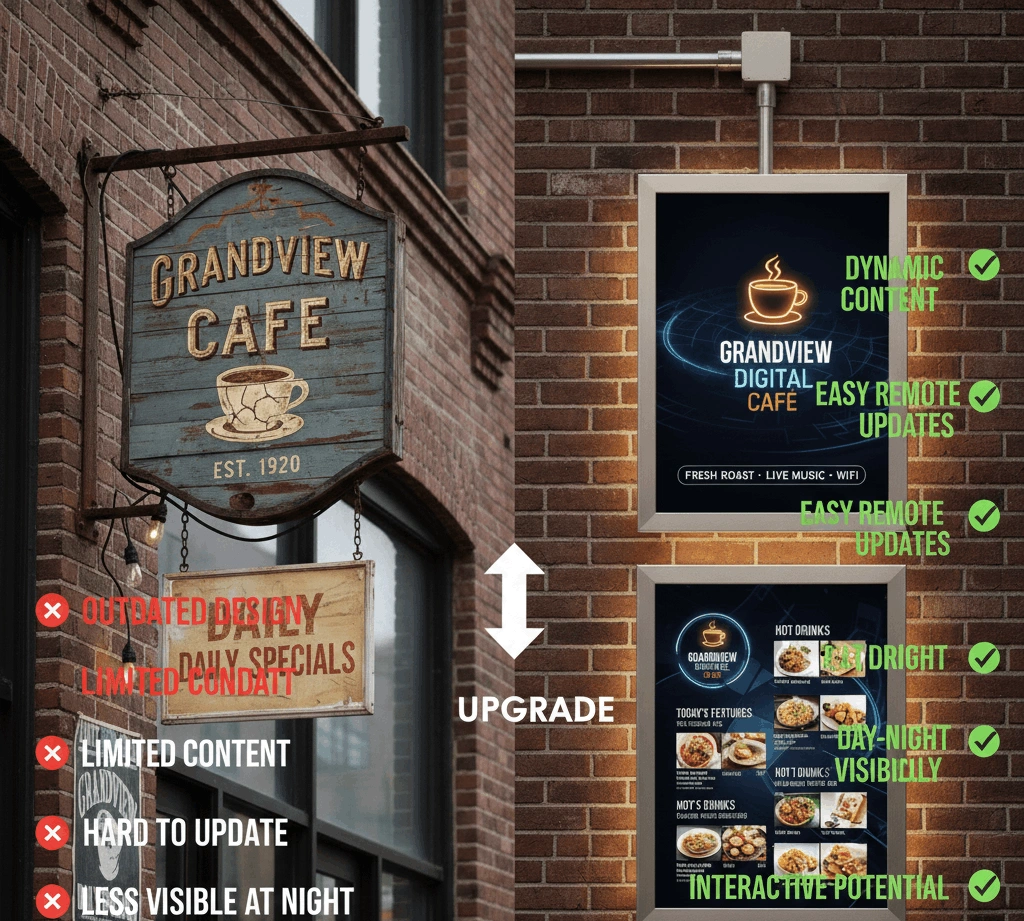
Upgrading to digital signage is not just about looks. It brings many practical benefits.
Better Attention
Digital screens are bright and moving. They attract more attention than printed signs.
Easy Content Updates
You can change messages in minutes without printing new materials.
Cost Saving Over Time
Although digital signage costs more at the start, it saves money by reducing printing costs.
Professional Appearance
Digital signage makes your space look modern and professional.
Flexible Messaging
You can show different messages at different times of the day.
Common Problems with Old Signage
Before upgrading, it helps to understand the problems with traditional signage.
Fixed Content
Once printed, the message cannot be changed easily.
Wear and Tear
Printed signs fade, tear, or get damaged over time.
High Printing Costs
Frequent updates mean frequent printing.
Limited Space
You can show only one message at a time.
Digital signage solves all these issues.
Step 1: Review Your Current Signage
The first step in upgrading is to review what you already have.
Ask yourself:
- Where are the signs placed?
- What messages do they show?
- How often do messages change?
- Who reads these signs?
This helps you decide what type of digital signage you need.
Step 2: Decide Your Goal for Digital Signage
Different businesses have different goals.
Your goal might be:
- Advertising products
- Showing offers and discounts
- Sharing information
- Guiding visitors
- Improving brand image
Clear goals help you choose the right screens and content.
Step 3: Choose the Right Type of Digital Display
Not all digital displays are the same. Choosing the right one is very important.
LED Displays
LED displays are bright and visible from far away. They are good for both indoor and outdoor use.
LCD Screens
LCD screens are common for indoor spaces. They are clear and cost-effective.
Video Walls
Multiple screens joined together for large displays.
For indoor spaces, indoor Led Displays are very popular because they provide bright visuals without taking much space.
Step 4: Decide Where to Place Digital Signage
Good placement makes digital signage more effective.
Common placement areas:
- Entrance areas
- Waiting rooms
- Near billing counters
- Inside stores
- Hallways and corridors
Make sure the screen is easy to see and not blocked.
Step 5: Check Power and Internet Requirements
Digital signage needs power and sometimes internet.
Before installation:
- Check power points
- Ensure stable electricity
- Decide if internet connection is needed
Some digital signage systems work offline, while others need internet for updates.
Step 6: Select Digital Signage Software
Software controls what appears on the screen.
Good software allows you to:
- Upload images and videos
- Schedule content
- Update messages remotely
- Control multiple screens
Choose software that is easy to use and reliable.
Step 7: Convert Old Content into Digital Format
Old signage content needs to be redesigned for screens.
Tips for digital content:
- Use large text
- Keep messages short
- Use clear images
- Add motion where needed
Printed posters do not always work well on screens without changes.
Step 8: Create Engaging Digital Content
Content is the heart of digital signage.
Good content should:
- Be easy to read
- Match your brand colors
- Use simple messages
- Include visuals or videos
Avoid overcrowding the screen with too much information.
Step 9: Install the Digital Signage Hardware
Installation includes:
- Mounting the screen
- Connecting power
- Setting up software
- Testing display
Professional installation is recommended for safety and proper setup.
Step 10: Test Before Full Use
Before going live:
- Test screen brightness
- Check sound if used
- Test content schedule
- Ensure smooth playback
Testing avoids problems later.
Step 11: Train Staff to Use Digital Signage
Even the best system needs basic training.
Staff should know:
- How to change content
- How to turn screens on and off
- How to report issues
Simple training keeps things running smoothly.
Step 12: Maintain Digital Signage Regularly
Digital signage needs basic care.
Maintenance tips:
- Clean screens regularly
- Check cables
- Update software
- Replace faulty parts early
Good maintenance extends the life of the system.
Cost Comparison: Old Signage vs Digital Signage
Old Signage Costs
- Printing
- Design changes
- Replacement
- Labor
Digital Signage Costs
- Initial setup
- Electricity
- Software
Over time, digital signage becomes more cost-effective.
Industries That Benefit Most from Digital Signage
Digital signage works well in many industries.
Retail Stores
- Show offers
- Promote products
- Improve customer experience
Offices
- Share notices
- Display goals
- Welcome visitors
Hospitals
- Patient information
- Directions
- Health messages
Restaurants
- Digital menus
- Promotions
- Waiting time updates
Common Mistakes to Avoid When Upgrading
Avoid these mistakes:
- Choosing wrong screen size
- Poor placement
- Too much content
- Ignoring maintenance
- Using low-quality software
Planning helps avoid these problems.
Indoor vs Outdoor Digital Signage
Indoor Digital Signage
- Lower brightness needed
- Controlled environment
- Clean visuals
This is where indoor Led Displays work best.
Outdoor Digital Signage
- Needs weather protection
- High brightness
- Strong build
Choose based on location.
How Digital Signage Improves Customer Experience
Digital signage helps customers by:
- Providing clear information
- Reducing confusion
- Creating interest
- Saving time
Happy customers are more likely to return.
Measuring the Success of Digital Signage
You can measure success by:
- Increased sales
- Better engagement
- Fewer questions from customers
- Positive feedback
Adjust content based on results.
Future of Digital Signage
Digital signage continues to grow with:
- Smart content
- Live updates
- Interactive screens
- Better display quality
Upgrading now prepares your business for the future.