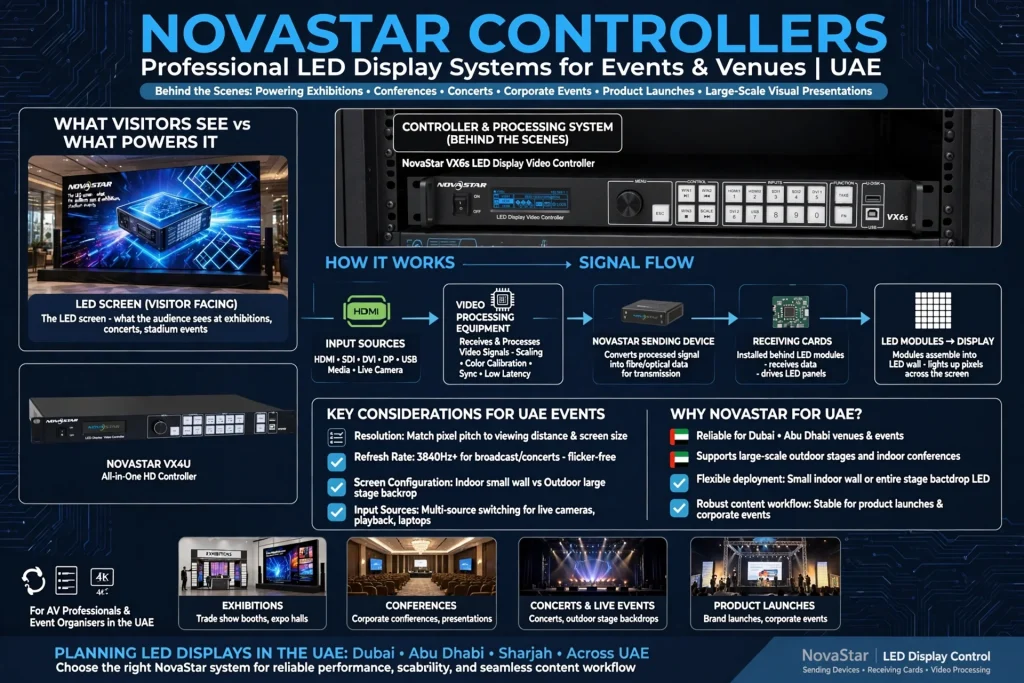
NovaStar controllers are an important part of professional LED display systems used for exhibitions, conferences, concerts, corporate events, product launches and large-scale visual presentations. While an LED screen is the part visitors see, the controller and processing system work behind the scenes to determine how video signals are received, processed, scaled and displayed across the LED modules.
For event organisers and AV professionals in the UAE, choosing the right LED control system is important because event displays can vary from a small indoor LED wall to a large outdoor screen covering an entire stage backdrop. The system needs to handle the required resolution, refresh rate, input sources, screen configuration and content workflow.
NovaStar is widely associated with LED display control, including sending devices, receiving cards and video processing equipment. Understanding how these components work makes it easier to plan reliable LED displays for venues in Dubai, Abu Dhabi and other UAE locations.
What Is a NovaStar Controller?
A NovaStar controller is a device used to manage the signal and display configuration of an LED screen.
Depending on the system architecture, a NovaStar solution may include a video processor, sending device and receiving cards installed inside LED cabinets.
The video source might come from a laptop, media server, camera, switcher or other professional video equipment. The controller processes the incoming signal and distributes the appropriate data to the LED display.
This allows a large LED wall to function as one coordinated visual surface.
The controller can also provide functions such as input switching, scaling, screen configuration, image adjustment and display management, depending on the model.
How NovaStar LED Control Systems Work
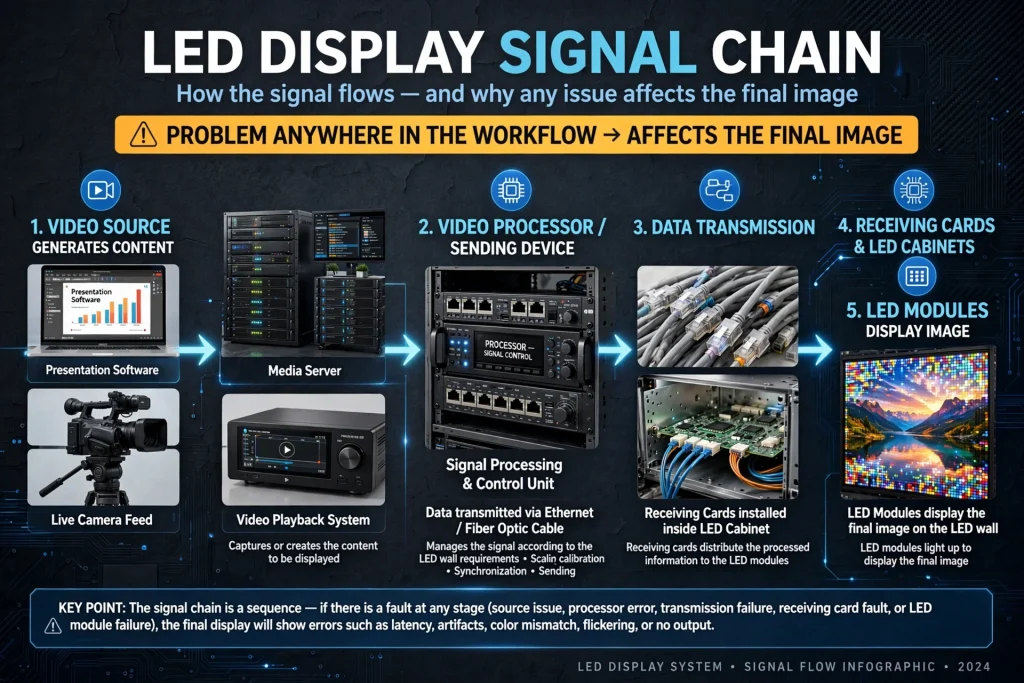
A typical LED display system has several stages.
First, a video source generates the content. This could be presentation software, a media server, live camera feed or video playback system.
The signal then reaches a video processor or sending device. The processing equipment manages the signal according to the requirements of the LED wall.
Data is transmitted to receiving cards connected to the LED cabinets.
The receiving cards distribute the processed information to the LED modules.
The modules then display the image.
This signal chain is important because a problem anywhere in the workflow can affect the final image.
NovaStar Sending Devices
Sending devices are responsible for transmitting processed image data toward the LED display system.
Depending on the model and configuration, a sending device can handle particular input resolutions, output capacities and control requirements.
In a professional event environment, the sending device forms an important connection between the content source and LED wall.
For example, a presentation laptop may feed an HDMI or DisplayPort signal into the control system. The sending equipment then communicates the required data to the LED receiving cards.
The exact input and output capabilities depend on the model, so technical specifications should always be checked before purchasing.
NovaStar Receiving Cards
Receiving cards are installed within LED display cabinets or connected to the LED modules.
Their primary role is to receive data from the sending system and distribute it to the appropriate LED pixels.
Large LED walls can contain many receiving cards because the display consists of multiple cabinets and modules.
The receiving card configuration needs to match the LED panel design, scan configuration, colour requirements and controller architecture.
Incorrect configuration can lead to issues such as incorrect image mapping, flickering, module problems or abnormal display behaviour.
NovaStar Video Processors
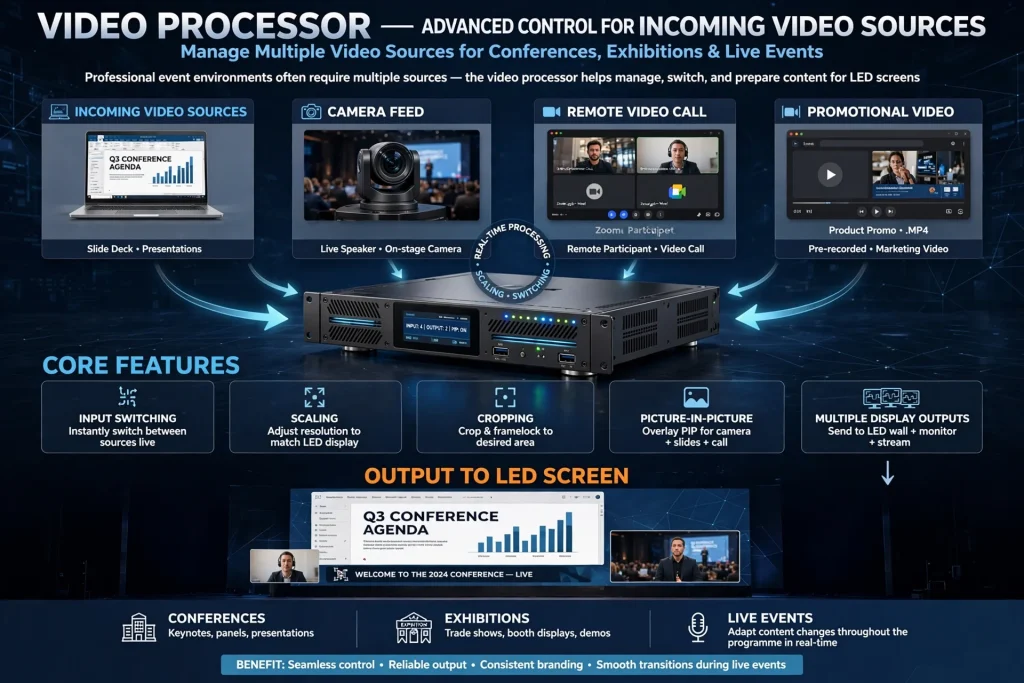
A video processor provides more advanced control over incoming video sources.
Professional event environments often require multiple sources. For example, a conference may use a presentation laptop, camera feed, remote video call and promotional video.
A video processor can help manage these sources and prepare them for the LED screen.
Depending on the model, features may include input switching, scaling, cropping, picture-in-picture functions and multiple display outputs.
This is particularly useful for conferences, exhibitions and live events where content changes throughout the programme.
Why Video Processing Matters for LED Walls
An LED wall does not necessarily have the same resolution or aspect ratio as the video source.
For example, a laptop may output a standard video resolution while the LED wall has a custom pixel canvas.
The video processor needs to adapt the source to the display.
Scaling allows the image to fit the LED wall correctly.
Without proper processing, content may appear stretched, cropped or surrounded by unwanted blank areas.
Professional processing therefore helps maintain consistent visual quality during an event.
NovaStar Controllers for Exhibition Displays
Exhibitions are one of the most common applications for professional LED display systems.
A UAE exhibition stand may use a large LED wall to display corporate videos, product demonstrations, destination content or promotional campaigns.
At venues such as Dubai World Trade Centre, exhibitors often need digital displays that can operate continuously throughout exhibition hours.
The controller needs to support the required content sources and screen configuration.
For exhibitors planning a large digital wall, working with an experienced Event Displays Led screens Supplier can help ensure that the screen, controller, processor, receiving cards and content workflow are properly matched.
NovaStar Controllers for Conferences
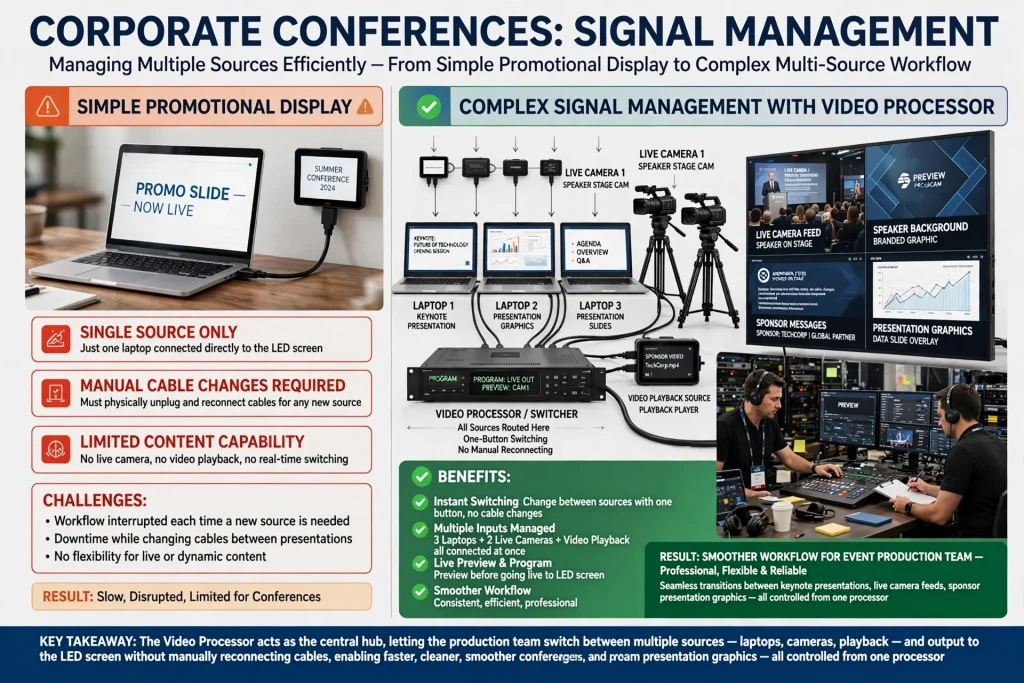
Corporate conferences often require more complex signal management than a simple promotional display.
A conference may have several laptops, presentation systems, live cameras and video playback sources.
The LED screen might be used for keynote presentations, speaker backgrounds, live camera feeds, sponsor messages and presentation graphics.
A video processor can help the production team switch between these sources without manually reconnecting cables.
This creates a smoother workflow for the event production team.
LED Screens for Corporate Events in Dubai
Dubai hosts corporate conferences, product launches, networking events and business presentations throughout the year.
LED displays can form the centrepiece of a stage or presentation environment.
A NovaStar-based control system can support a range of content sources depending on the equipment configuration.
For corporate events in areas such as Downtown Dubai, Business Bay, Dubai Marina and Dubai Internet City, the screen system should be planned around the venue’s stage dimensions, audience size, viewing distance and available technical infrastructure.
NovaStar Controllers for Outdoor Events
Outdoor LED displays introduce additional requirements.
Large outdoor screens may use higher brightness, larger pixel pitch and weather-resistant cabinets.
The controller still needs to manage the video signal accurately, but the overall system also needs appropriate power distribution, structural support and environmental protection.
For outdoor events in Dubai or Abu Dhabi, event teams should consider sunlight, temperature, viewing distance and operating duration.
The controller should be selected as part of the complete LED display system rather than treated as an isolated component.
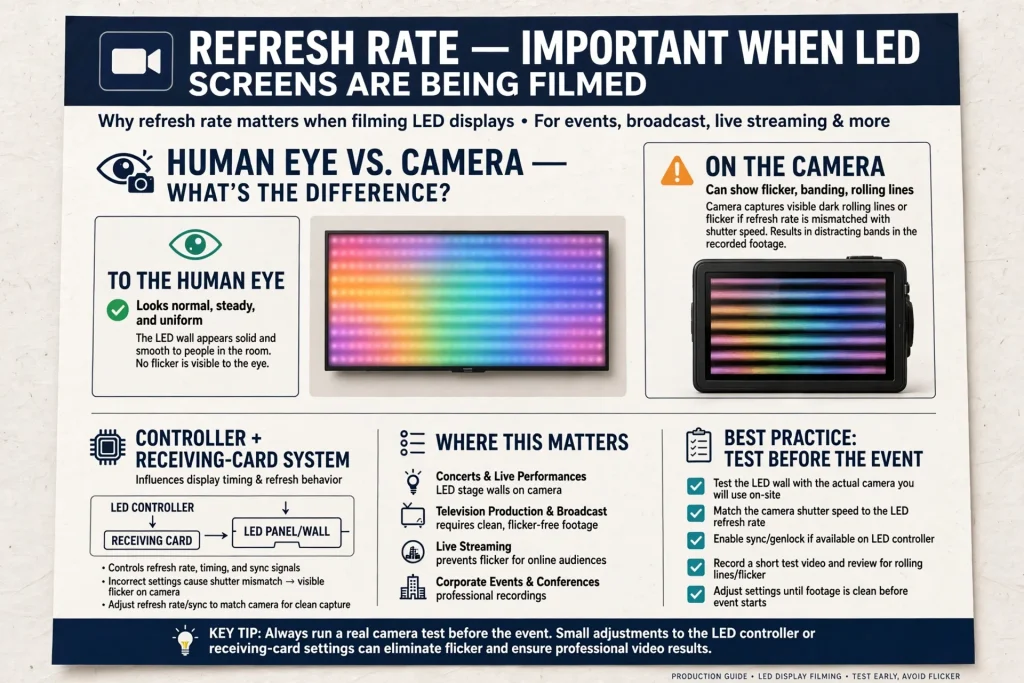
Refresh Rate and Event Cameras
Refresh rate is particularly important when LED screens are being filmed.
An LED display may look normal to the human eye but produce visible lines, flicker or rolling patterns on a camera if the display settings are not suitable.
This becomes important for conferences, concerts, television production, live streaming and corporate events where professional cameras are pointed toward the LED wall.
The controller and receiving-card system can influence display timing and refresh behaviour.
Event production teams should test the LED wall with the actual cameras before the event begins.
LED Screen Calibration
Calibration helps LED displays produce consistent images across multiple cabinets and modules.
A large LED wall may contain thousands or millions of individual pixels.
Without proper calibration, differences in brightness or colour between modules can become visible.
Professional LED systems can use calibration data to improve consistency.
Calibration is especially important for branded content because company colours, product photography and video footage should appear consistently across the entire display.
NovaLCT and LED Screen Configuration
NovaLCT is software associated with configuring compatible NovaStar LED control systems.
Depending on the system, configuration software can be used for tasks such as screen setup, receiving-card configuration and display parameters.
The software is generally used by trained technicians rather than casual event users.
Important configuration parameters can include cabinet dimensions, module arrangement, data mapping, scan mode and other display-specific settings.
Incorrect configuration can affect the screen’s image output, so technicians should maintain backups of working configurations.
Screen Mapping and Cabinet Layout
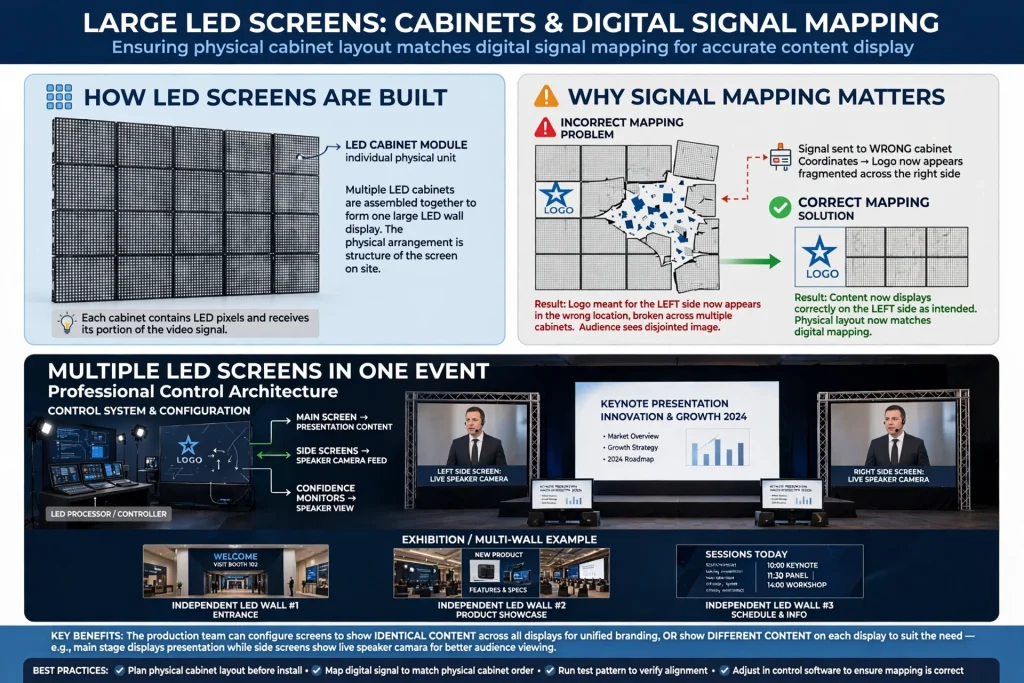
Large LED screens are made from multiple cabinets.
The physical arrangement of those cabinets must correspond to the digital signal mapping.
If the physical and logical layouts do not match, the image can appear in the wrong location.
For example, a logo intended to appear on the left side of the screen could appear across another cabinet if the mapping is incorrect.
Proper screen mapping ensures that the content corresponds to the physical structure of the LED wall.
Multiple LED Screens in One Event
Large events may use several LED displays.
A stage could have one main screen, two side screens and additional confidence monitors.
An exhibition could have several independent LED walls across different parts of a stand.
A professional control architecture allows these displays to be configured according to the event’s requirements.
The production team can decide whether screens show identical content or different content.
This is particularly useful for conferences where the main stage screen may display presentation content while side screens show speaker cameras.
LED Controllers and Aspect Ratio
Aspect ratio is another important consideration.
Content created in 16:9 format may not automatically fit an unusually shaped LED wall.
Some exhibition displays use very wide screens, portrait configurations or custom-shaped LED structures.
The processing system needs to handle the content appropriately.
The event design team should therefore establish the LED wall’s pixel resolution before creating final graphics and video.
This prevents unnecessary cropping or distortion.
NovaStar Controllers for Product Launches
Product launches require strong visual presentation.
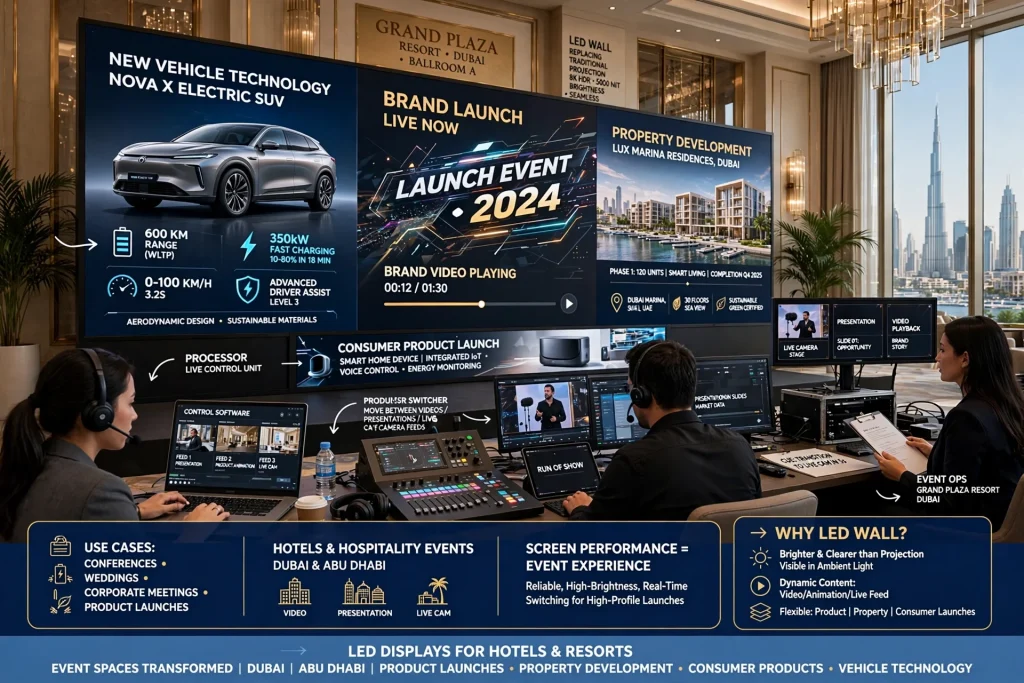
A new vehicle, technology product, property development or consumer product can be presented using large-format LED visuals.
The screen can display product animations, technical information, brand videos and launch graphics.
A processor can allow the production team to move between videos, presentations and live camera feeds.
For high-profile launches in Dubai, screen performance becomes part of the overall event experience.
LED Displays for Hotels and Hospitality Events
Hotels and resorts across Dubai and Abu Dhabi use event spaces for conferences, weddings, corporate meetings and product launches.
LED walls can replace traditional projection screens where the venue design and event requirements support them.
A controller allows event technicians to manage presentation content and video playback.
Brightness and screen configuration should be selected according to the ballroom or event room.
The display should complement the venue rather than overwhelm the audience.
NovaStar Controllers for Live Events
Concerts and live entertainment require fast and reliable content management.
The LED wall may display live camera feeds, animations, sponsor content, artist visuals and event graphics.
A professional processing system helps the production team coordinate these sources.
For large productions, redundant signal paths and backup equipment may also be considered.
The exact redundancy architecture depends on the event’s size and risk requirements.
Signal Sources for Event LED Screens
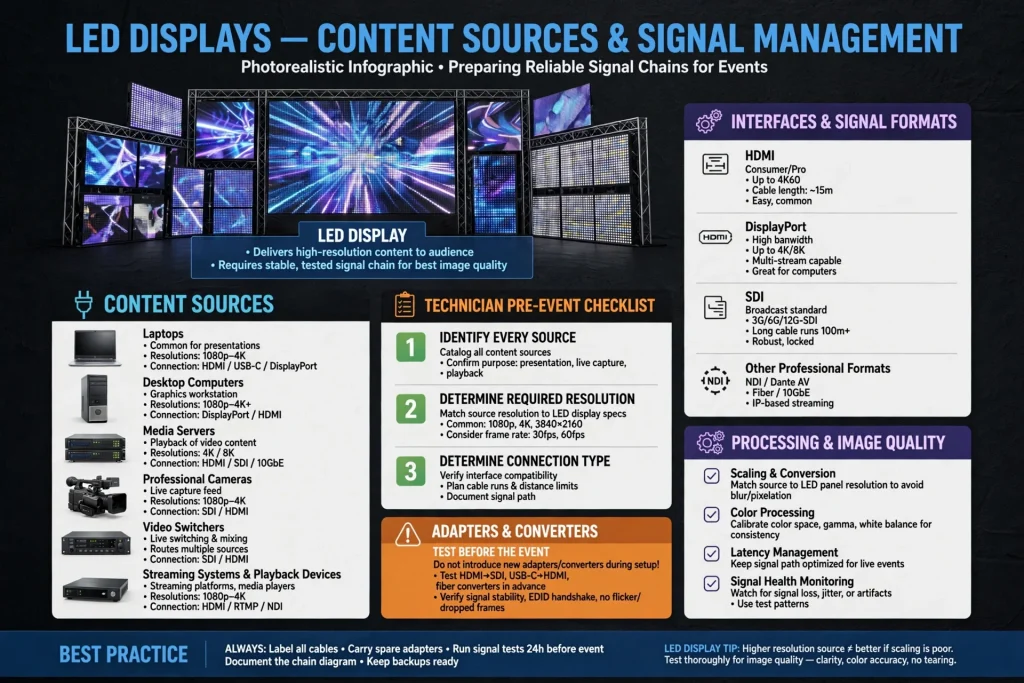
LED displays can receive content from many different sources.
Common sources include laptops, desktop computers, media servers, professional cameras, video switchers, streaming systems and playback devices.
Before an event, technicians should identify every source and determine its required resolution and connection type.
Common interfaces can include HDMI, DisplayPort, SDI and other professional signal formats depending on the production equipment.
Adapters and converters should be tested before the event rather than introduced for the first time during setup.
Processing and Image Quality
A high-quality LED module cannot compensate for poor signal management.
Image quality depends on the complete system, including the LED panels, receiving cards, processing equipment, source signal, content resolution and calibration.
A good controller setup helps maintain stable and correctly scaled images.
Content should also be created at an appropriate resolution.
Low-resolution source material can appear soft or pixelated when displayed across a large LED wall.
Redundancy for Critical Events
Important events may require backup systems.
A critical conference, product launch or live broadcast cannot easily stop because of one failed component.
Depending on the production requirements, event teams may use backup playback systems, spare receiving cards, additional processors or redundant signal paths.
The appropriate redundancy level depends on the importance and complexity of the event.
A professional supplier should explain the available options before the event rather than after a failure occurs.
Choosing a NovaStar Controller
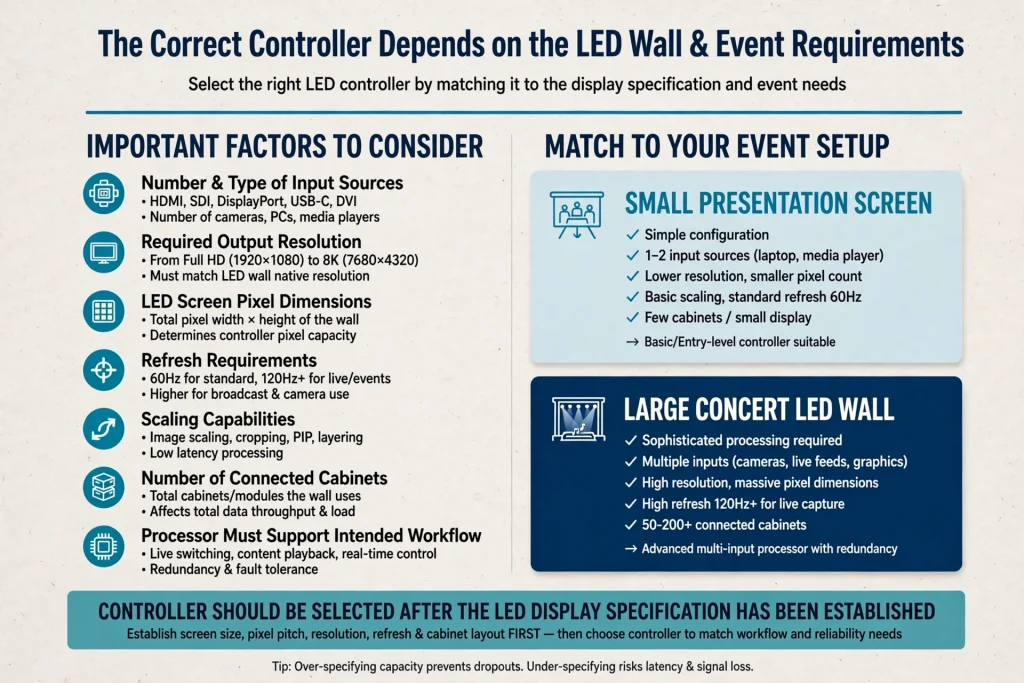
The correct controller depends on the LED wall and event requirements.
Important factors include the number and type of input sources, required output resolution, LED screen pixel dimensions, refresh requirements, scaling capabilities and number of connected cabinets.
The processor should also support the intended workflow.
A small presentation screen may require a relatively simple configuration, while a large concert LED wall may require sophisticated processing and multiple inputs.
The controller should therefore be selected after the LED display specification has been established.
Common NovaStar Configuration Problems
Incorrect configuration is one of the main causes of LED display problems.
Common issues can include incorrect cabinet mapping, wrong receiving-card configuration, mismatched screen dimensions and unsuitable input resolution.
Other problems may involve loose connections, incorrect signal routing or unsupported source formats.
Keeping a backup of the working configuration can make troubleshooting much easier.
Technicians should also document the screen’s physical cabinet arrangement and signal connections.
Testing an LED Control System Before an Event
Testing should take place before visitors arrive.
The production team should test every input source, display section, brightness setting and content format.
Camera testing is particularly important when the event will be recorded or streamed.
The team should also test transitions between presentation slides, videos, live cameras and backup sources.
If the event uses several LED screens, every screen should be checked individually and as part of the complete system.
Maintenance and Troubleshooting
LED control equipment should be stored and transported carefully.
Dust, moisture, excessive heat and physical damage can affect electronic equipment.
Connectors should be checked before installation.
Receiving cards and other components should be kept in appropriate conditions when not in use.
For recurring events, maintaining an equipment checklist can help technicians identify missing cables, adapters, processors and spare components before arriving at the venue.
Dubai and Abu Dhabi Event Applications
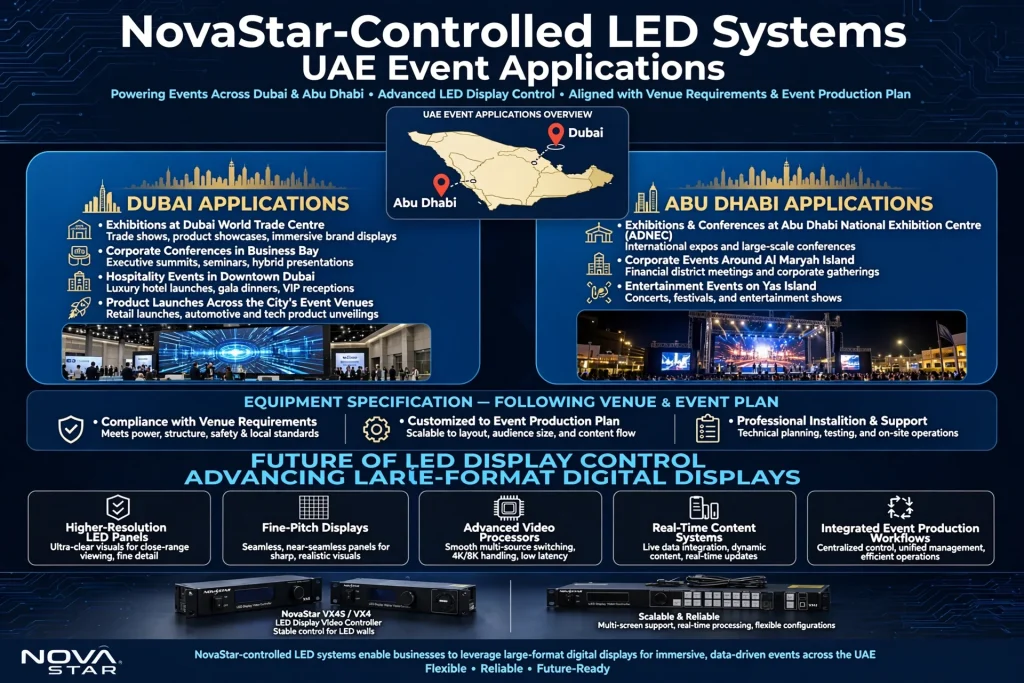
NovaStar-controlled LED systems can support many UAE event applications.
Dubai applications may include exhibitions at Dubai World Trade Centre, corporate conferences in Business Bay, hospitality events in Downtown Dubai and product launches across the city’s event venues.
Abu Dhabi applications may include exhibitions and conferences at Abu Dhabi National Exhibition Centre (ADNEC), corporate events around Al Maryah Island and entertainment events on Yas Island.
The equipment specification should always follow the actual venue requirements and event production plan.
Future of LED Display Control
LED display systems continue to become more sophisticated.
Higher-resolution LED panels, fine-pitch displays, advanced video processors, real-time content systems and integrated event production workflows are changing how businesses use large-format digital displays.
As LED walls become more common at exhibitions and corporate events, controller technology becomes increasingly important.
The future is not only about making screens larger. It is about improving content flexibility, signal management, image quality and operational reliability.
Final Thoughts
NovaStar controllers form an important part of professional LED display systems used for exhibitions, conferences, concerts, product launches and corporate events.
The controller, sending device, receiving cards, video processor, LED cabinets and content source all work together to create the final image.
For UAE events, the right configuration depends on the screen size, pixel pitch, viewing distance, content sources, refresh requirements and venue environment.
Whether an LED wall is being installed at Dubai World Trade Centre, a conference venue in Business Bay, an exhibition in Abu Dhabi or an outdoor event on Yas Island, proper planning and testing are essential.
A reliable LED display is not simply a collection of LED panels. It is a complete signal and processing system in which the controller plays a central role.